


 Mixx is another popular social media website among many others out there and the site helps you to submit any of your favorite or interesting content which you want to share it to other people. This social media site combines social networking and bookmarking. Mixx was launched in September 2007 and has a format similar to Propeller (Netscape) and Digg where you vote stories up or down. The difference is that once you submit stories to Mixx, you can’t delete it or change its title or description while you might be able to do this in other social media site. All of the content is user-generated, there are no editor who decides what you should find interesting, so you can submit stories, videos, photos —whatever you find informative, interesting, fun or different.
Showing posts with label Recommended Internet Marketing Tools and Services. Show all posts
Showing posts with label Recommended Internet Marketing Tools and Services. Show all posts
Thursday, April 8, 2010
Mixx Social Media bookmarking website
Mixx is another popular social media website among many others out there and the site helps you to submit any of your favorite or interesting content which you want to share it to other people. This social media site combines social networking and bookmarking. Mixx was launched in September 2007 and has a format similar to Propeller (Netscape) and Digg where you vote stories up or down. The difference is that once you submit stories to Mixx, you can’t delete it or change its title or description while you might be able to do this in other social media site. All of the content is user-generated, there are no editor who decides what you should find interesting, so you can submit stories, videos, photos —whatever you find informative, interesting, fun or different.

Thursday, April 1, 2010
Pinging service using Ping-o-matic
Pinging is one of the most effective, easiest and quickest things webmasters can do to promote their web pages. What is ping? A blog can simply use a pinging service to tell search engine “Im Over Here”, and the blog would get indexed almost immediately. One of the most popular site which offer this kind of service is Ping-o-matic. This "pinging" service is free to use and you dont even have to register to use the service. Though Ping-o-matic was designed to prromote blogs, but you can also use it to promote website.
Tips and tricks to optimize Digg
Submitting your webpage, blog post or article to Digg is an excellent method to gain additional exposure. Once you submitted your story, other users can vote for it. Content with more votes votes will rank higher and benefit from massive exposure. Story with the highest votes will also be featured on Digg’s frontpage in addition to ranking higher on searches. Everyday, lots of internet marketers, webmasters and bloggers struggle and use many kind of tricks, in attempts to get their contents or articles featured on Digg’s front page.
 Set up a good interesting profile and create for yourself an eye catching avatar (avatar= logo or personal image) to attract attention to your posts. With 15 submissions per page and hundreds of submissions per hour, you need to have something that make your posts stand out from the other.

- Take your time coming up with good title and description, put in your keywords to optimize SEO. Your title and description will be displayed to visitors and that is what you are using to convince readers to click on your link. When it comes to the description, do not reveal anything, make the visitors curious about what is written in your posts. Make it unique rather than just copy and paste the first sentence or paragraph of your post into the field.
- Submit a good quality content and made from your original content, not copy-pasted from other article.
- Don't always Digg your own posts, Digg does not like their users who submit their own page too frequently.
- Try to accumulate as many friends as you can (this is said to be the most important part), select those who are active and will digg your stories when you ask them to. You can anytime replace the active friends with idle ones. There is a button for you to check the ones who dugg your stories.
- Do leave comments and respond if other user leaves a comment on your story, you can as well digg their story too. Do not spam, or you might get yourself banned and your access terminated.
How to submit articles to Digg
One of the most favorite method for people to promote their articles is through the website called Digg. This steps will show you how to submit an article on Digg and share it with the world.
First, of course you need to register and have Digg account for your own. You can read my previous article on how to create a Digg account.
First, of course you need to register and have Digg account for your own. You can read my previous article on how to create a Digg account.
 After your account has been verified, login to Digg and on the main page click on “Submit New” (the third tab on top of the page). Click that link and it will take you to the submission page.

- Find an article, blog post or image which you would like to submit (you also can submit yours). Copy and paste the website URL address into the submission form. Specify whether the submission is a video, image or news article and then press Continue (it will take a few moments for your submission to be processed).
- Next will be the page saying it is checking for duplicates to ensure someone else has not already submitted the page to Digg.
- After that you will reach to a page where you are asked to add a title and description (write a short interesting blurb about the article before submitting it). The title and description will be seen by visitors when they are making the decision on wether to click on your link or not. After that pick an appropriate topic category which your article belongs to (make sure is accurate, otherwise you may get many negative feedbacks and comments on your posts). Fill out the form and submit your article by clicking “Submit Story”.
- Your article will then automatically appear in the Upcoming section of its category and is officially a part of the Digg.com community and other Digg users can now read it and vote on it. If different people submit the same page, it gets votes and pushed to the first page.
What is Digg and how to join
Digg is a social news site for people to discover and share content anywhere on the internet. If you find a page which you want to share, you can “digg” it byy submitting the URL and a brief descripption of the page through the Digg website. There is no editors at Digg. Digg users will see your submission and they have options to “digg” it (help promote) or “bury” it (help remove spam). They even can Digg and bury comments they like or dislike. Digg surfaces the best content as voted on by the users, and if your content appear on the Digg’s home page, it will be seen to millions of visitors and therefore, you can expect a huge bump in traffic and receive lots of backlinks (which is good for your SEO). However, it is difficult and only a small number of posts will ever make the Digg front page.
 All of the Digg’s website content (from news to videos to images) comes from the site’s visitors (that would be you and other Digg account holders) and it is submitted on a voluntary basis. Among all of the social bookmarking websites, Digg is one of the most popular one, and according to Alexa.com Digg is in the top 250 most visited websites on the entire web. It is reported that Digg has approximately 33 million visitors each month and has 24 million account holders and 5 million of them are active on the site everyday.
Everytime you submit an article, video or image, it will automatically appear in “Upcoming Stories” and it will be seen by other members, if they like it, they ‘digg it’. If your submission does not receive enough Diggs within a certain time period, it will eventually falls out of the “Upcoming” section.
 All of the Digg’s website content (from news to videos to images) comes from the site’s visitors (that would be you and other Digg account holders) and it is submitted on a voluntary basis. Among all of the social bookmarking websites, Digg is one of the most popular one, and according to Alexa.com Digg is in the top 250 most visited websites on the entire web. It is reported that Digg has approximately 33 million visitors each month and has 24 million account holders and 5 million of them are active on the site everyday.
Everytime you submit an article, video or image, it will automatically appear in “Upcoming Stories” and it will be seen by other members, if they like it, they ‘digg it’. If your submission does not receive enough Diggs within a certain time period, it will eventually falls out of the “Upcoming” section.
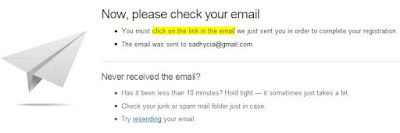
- Before you begin you need to register first with Digg, enter your info or data needed, after that you will receive an email after you complete the registration process. Click the link given in the email to be a new Digg Registered User.

- After your account is verified, you can add optional information to your profile (you can always change your profile data in Profile tab) or skip the step and start Digging.
Propeller and Reddit Social News Sites
If you want to find more social news sites to increase your website traffic further, you can try Propeller and Reddit.
 Propeller (formerly known as Netscape) and Reddit, both are famous social news websites, meaning that they are programmed by its members — the audience, includes you. You can find plenty topics from technology, gadget to humor to politics and to many more. Once you become their member (it is free to become one), it allows you to submit and vote on any stories, share it with friends and maintain a list of your favorite articles and upcoming articles. You also can submit pages from your own website or blogs that you feel are worth telling others about and at the same time inviting more traffic to your spot on the web. An excellent reward for well written or informative content.
 Propeller (formerly known as Netscape) and Reddit, both are famous social news websites, meaning that they are programmed by its members — the audience, includes you. You can find plenty topics from technology, gadget to humor to politics and to many more. Once you become their member (it is free to become one), it allows you to submit and vote on any stories, share it with friends and maintain a list of your favorite articles and upcoming articles. You also can submit pages from your own website or blogs that you feel are worth telling others about and at the same time inviting more traffic to your spot on the web. An excellent reward for well written or informative content.
What is Diigo and how to use Diigo
 Diigo is a social bookmarking service. Maybe many of you already know how to favorite a web page using Internet Explorer or bookmark using Firefox browser. In Diigo, the service is more or less the same but instead of saving the URL in your browser, you save it on the internet. The advantages of using Diigo to your everyday blogging or web surfing:
Friday, March 12, 2010
Use Docstoc to Get Adsense Approved Easily and Fast
 In order to share many types of your documents to other users online, Docstoc provides you that service. DocStoc was founded by Alon Shwartz and Jason Nazar in August 2007 and it was publicly launched in November 2007. In Docstoc, you can upload as many documents as you like and create free high quality backlinks to your sites, blogs, hubs, lens, etc. and earn a percentage of revenue. Docstoc supports .doc, .xls, .pdf, .rtf, .txt, .docx, .ppt, .pps, .xlsx, and .ppts file formats. You can embed Docstoc documents onto your own websites and blogs, this feature is interesting because you can scroll, zoom, drag, rotate, and more with the DocStoc widget.
Thursday, March 11, 2010
Tips to optimize AdSense for Search
AdSense for search can be a great way to increase website revenue for the owner. You can place 2 AdSense search boxes on a page. When visitors search some query using the search box on your pages and click on the ads which appear on the top and right side of the results page, you get paid. To implement Adsense for search you can simply copy and paste the code given into any place on your website and let the search engine collect the dollars for you :)
As many webmasters suggest that you should change the color of the search box to match the background of your site and text so that your AdSense search box should look like it belongs to the page, well..in fact a colorful and recognizable search box will stand out on your site and it works too, many bloggers have different result with both of them.
You also have the option given by AdSense whether you’d like the search results to be opened within your own website or to be host by Google. Many publisher choose to open within their own sites so that readers will believe that the source of search resullt is from your blog and this makes them love to click ads. The other reason is that the site owner have more control over the design. It’s not a bad idea also to put your search box on the results page itself for any users who might want to make another searches.
Publishers also can insert keywords to refine the results to make them more relevant to your readers. Let’s say you have a website about Photoshop, you can enter the keywords “Adobe”, “Computer Softwares” and “Photos”.
Your AdSense search box should be placed where your visitors can find it with a quick glance. Locations such as below the header and right or left navigation column are good spots for this. Place it above the fold, it means that the visitors should not have to scroll down in order to notice the search box. You can also place it below each post for easy navigation.
Another important thing should be considered is adding your logo, this is a cool feature because it provides chance for your readers to see and remember your logo that might increase their chances of remembering your website for a future visit.
As many webmasters suggest that you should change the color of the search box to match the background of your site and text so that your AdSense search box should look like it belongs to the page, well..in fact a colorful and recognizable search box will stand out on your site and it works too, many bloggers have different result with both of them.
You also have the option given by AdSense whether you’d like the search results to be opened within your own website or to be host by Google. Many publisher choose to open within their own sites so that readers will believe that the source of search resullt is from your blog and this makes them love to click ads. The other reason is that the site owner have more control over the design. It’s not a bad idea also to put your search box on the results page itself for any users who might want to make another searches.
Publishers also can insert keywords to refine the results to make them more relevant to your readers. Let’s say you have a website about Photoshop, you can enter the keywords “Adobe”, “Computer Softwares” and “Photos”.
Your AdSense search box should be placed where your visitors can find it with a quick glance. Locations such as below the header and right or left navigation column are good spots for this. Place it above the fold, it means that the visitors should not have to scroll down in order to notice the search box. You can also place it below each post for easy navigation.
Another important thing should be considered is adding your logo, this is a cool feature because it provides chance for your readers to see and remember your logo that might increase their chances of remembering your website for a future visit.
Sunday, February 7, 2010
How to set up dial up internet connection
Dial-up internet access is an internet connectivity which operates through a standard telephone line. Here, an easy and simple guide to make a dial-up internet access on a computer running Windows Vista (any edition).
Tuesday, December 1, 2009
Optimizing Youtube videos online
Many people doesn’t aware that Youtube is the second largest search engine and the 3th top site on the web. Therefore those of you who do business online should consider taking advantage of this huge opportunities which can be a great marketing tool for starting your own business. The website is completely free and you can upload as many videos as you like. Some simple things that can improve your Youtube rankings include:
Youtube Sharing Tips and Tricks
YouTube is one of the hottest sites on the Web. It lets users to upload and view all sorts of video clips online. Here is little tricks and tips to help you better view and share Youtube videos.

- To share Youtube video to your friends via email, you can click the “Share” link underneath the video player on that video’s page. The Share menu will appear, click “Email this video” and fill in the email addresses that you want to send in the “To” box, separating multiple addresses with commas. You can add some message too if you like (optional). You also can share your Youtube Favorites list, just press the Share button and then proceed the steps as usual.

- If you want to share a Youtube video to a friend, sometimes you want the video to jump to where the most important part and start from there without having to watch the unnecessary part from the beginning. All you have to do is adding this below code to the end of the URL.
#t=04m72s
m stands for minute and s stands for second.
- Or if it is an embed code, put &start=80 to the end of the embed url. The value number of the code represent seconds. So if &start=80 means it will skip the first 80 seconds of the video.
- There is a search box appears when you embed Youtube video to your site. In order to hide the search box, you can simply add &showsearch=0 to the embed url.
- After watching Youtube video, you need to press ‘play’ button again if you want to replay it. If you want the video to replay automatically you can add &loop=1 to the url part of the embed code.
- To make Youtube video play automatically when it is loaded in a browser, you can add &autoplay=1
How to create Playlist in Youtube
In Youtube, a playlist is a list of videos you add in an organized order. In other words, it is simply a collection of videos, it is used just like a folder - organized by whatever criteria you deem appropriate. You can create as many playlist as you want. Videos in the playlist can be played randomly or in order you want. Playlist is quite similar with quicklist except that a quicklist is temporary (not saved when the browser is closed). All playlists can be set for two levels of privacy: “Private”, where only you can view it and “Public”, available for all users to view.

- First, you need to sign up to create Youtube account, otherwise you would not be able to create playlist in Youtube.
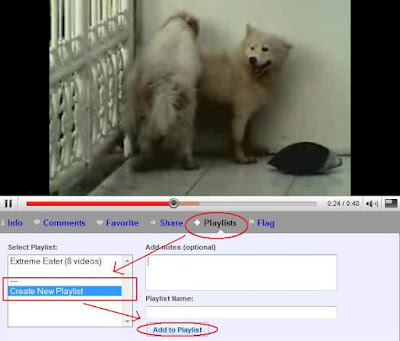
- When you are watching the video you want to add in the playlist, click the blue link “Playlist” below the vid.
- Inside the “Select Playlist” box, select Create New Playlist. Write the name of your playlist and you can add short notes about the playlist.

- Click “Add to Playlist” button and you will come to the page where you can enter additional information about the playlist such as Tags and Description, decide whether you want to make it private or public. Fill in the data you need to and save it.
- After you successfully creating a playlist, you can add some other videos into that playlist or creating another different playlist. The title of every playlist you created will appear in the “Select Playlist” box.
- To organize the order of your playlist you can click the dropdown menu on your username (top-right of the screen) and choose “Playlist”. Select which one of your playlist that you want to reorganize the order (at the left column of the screen). Then below of the page you will find list of videos from the playlist you select, click on the number next to the vid and change the order number.

How to make money with Youtube
Youtube, the most popular internet video networking community can be an excellent way to promote your website, affiliates, business or even making money with it. Since it can be used absolutely free, it is a great way to save on advertising costs.
The first thing you should do is of course register for Youtube account and follow the easy instruction provided. After that you can sign up for Google Adsense to earn extra income. Through Adsense, Youtube will pay your share from the revenues.
 To do that, you need to sign up first for the Youtube partnership, a revenue sharing program. Create your original videos and try not to copy others, pick your niche and decide what type of video you are going to upload (comedy, casual video logging, news, how-to, drama series, product reviews etc). Adding a watermark on your videos to direct users to your website is a great idea (of course you need to have a website). You are also allowed to insert link in the description box beside your videos to your site and you can put affiliate links and adsense on the site.
Once you have enough videos in your account, promote them by sending it to your friends, social networking sites and forums. You can leave video responses to other videos that match your interests. Find the latest videos posted by the most popular youtubers, make responses that are interesting or funny. If the youtuber likes it, he might favorite it and even mention you in one of his videos then it is a good news for you. Favourites help because they post to the youtubers channel, it’s just like free advertisement. Respond to any emails or messages you receive on Youtube to build a relationship with your viewers. Make more videos and upload them to Youtube, the more subscribers and views you get the better. Make sure the video file format is acceptable for Youtube.
The first thing you should do is of course register for Youtube account and follow the easy instruction provided. After that you can sign up for Google Adsense to earn extra income. Through Adsense, Youtube will pay your share from the revenues.
 To do that, you need to sign up first for the Youtube partnership, a revenue sharing program. Create your original videos and try not to copy others, pick your niche and decide what type of video you are going to upload (comedy, casual video logging, news, how-to, drama series, product reviews etc). Adding a watermark on your videos to direct users to your website is a great idea (of course you need to have a website). You are also allowed to insert link in the description box beside your videos to your site and you can put affiliate links and adsense on the site.
Once you have enough videos in your account, promote them by sending it to your friends, social networking sites and forums. You can leave video responses to other videos that match your interests. Find the latest videos posted by the most popular youtubers, make responses that are interesting or funny. If the youtuber likes it, he might favorite it and even mention you in one of his videos then it is a good news for you. Favourites help because they post to the youtubers channel, it’s just like free advertisement. Respond to any emails or messages you receive on Youtube to build a relationship with your viewers. Make more videos and upload them to Youtube, the more subscribers and views you get the better. Make sure the video file format is acceptable for Youtube.
Tuesday, November 17, 2009
How to change language in Firefox
To change your Firefox language to English (or any other language) you can simply download and reinstall Firefox with your preference language version from this link http://www.mozilla.com/en-US/firefox/all.html after that choose which language you prefer and start downloading. For English language you can use this link http://www.mozilla.com/en-US/products/download.html?product=firefox-3.6&os=win&lang=en-US
How to backup bookmarks in Firefox
There is always a chance that Firefox browser may crash due to various reasons such as new theme installation, add-on installation or any other reason. To have a backup data for bookmark in Firefox is always a good idea as you may never know you will need it someday. It only takes seconds to backup your bookmark, and you can choose two methods to do it (to do bookmarks backup for Internet Explorer browser you can click here):
Firefox Tricks and Tips
Quick search. If you discover a word or phrase during your reading on a website and you want to put it into a search engine? Most probably all of you might open in a new tab, go to Google or any other search engine provider and type the words or phrase in there.
Firefox Tips and Tricks
Address bar. Delete items from address bar history. Your browser has the ability to show previous visited URLs automatically. When you type the name of a website in location bar (address bar), the list of visited URLs will appear. If you do not want it to
How to backup Favorites in Internet Explorer
Follow these simple and easy steps to backup your Favorites in Internet Explorer:
Saturday, November 7, 2009
How to use PHP include
If you have a website with plenty of pages to update, to edit each page and change it one by one will be very tedious and boring things to do. The more page you have, the more possibility that you make mistakes. Using PHP include is certainly something you need and it is very helpful because not only it enables you to uniform certain parts of your content pages, but also update them all by only editing a single file.
Before you start using PHP includes, make sure that your web host or server can handle PHP files. Secondly, when you are using PHP includes on any pages, make sure the extension of those page is “.php” instead of “.html”. By using this PHP include script, once uploaded to the web, all of your files will merge appropriately to form one page.
Here’s how the PHP code looks like:
The code can be pasted into sidebars, header, tables and anywhere you like.
Change the "filename" to anything you like, to make things easier to remember, it is suggested that you give it a name which correlates to the content you will be putting in it. For example if it is “header.php” then the file should be made especially for header. If the file contains advertisements for your site, then you can name it “ads.php”.
Next, you will want to create a page where the content of this page will appear in the page that contains the PHP include code. Make sure you save it with the exact same name you assigned to the code above, otherwise the script wont work.
Sometimes the path names doesn’t work and therefore you need to use alternative way, that is using the URL in the include instead, like this:
Using this method is less efficient in terms of server resources because (just like a browser) it has to create an HTTP session, get the file and then pull it in (even both of them located at the same server). This method of course is slower than using a pathname.
You can include files with .html, .php, .txt, .asp and other extensions.
Before you start using PHP includes, make sure that your web host or server can handle PHP files. Secondly, when you are using PHP includes on any pages, make sure the extension of those page is “.php” instead of “.html”. By using this PHP include script, once uploaded to the web, all of your files will merge appropriately to form one page.
Here’s how the PHP code looks like:
<?php include("filename.php"); ?>
The code can be pasted into sidebars, header, tables and anywhere you like.
Change the "filename" to anything you like, to make things easier to remember, it is suggested that you give it a name which correlates to the content you will be putting in it. For example if it is “header.php” then the file should be made especially for header. If the file contains advertisements for your site, then you can name it “ads.php”.
Next, you will want to create a page where the content of this page will appear in the page that contains the PHP include code. Make sure you save it with the exact same name you assigned to the code above, otherwise the script wont work.
Sometimes the path names doesn’t work and therefore you need to use alternative way, that is using the URL in the include instead, like this:
<?php include("http://www.domainname.com/directory/filename.php"); ?>
Using this method is less efficient in terms of server resources because (just like a browser) it has to create an HTTP session, get the file and then pull it in (even both of them located at the same server). This method of course is slower than using a pathname.
You can include files with .html, .php, .txt, .asp and other extensions.
Subscribe to:
Posts (Atom)